Note
Go to the end to download the full example code.
Catalogs Operations
This example demonstrates how to perform standard operations on a catalog. This example requires an internet connection to access ComCat.
- Overview:
Load catalog from ComCat
Create filtering parameters in space, magnitude, and time
Filter catalog using desired filters
Write catalog to standard CSEP format
Load required libraries
Most of the core functionality can be imported from the top-level csep package. Utilities are available from the
csep.utils subpackage.
import csep
from csep.core import regions
from csep.utils import time_utils, comcat
Load catalog
PyCSEP provides access to multiple catalog webservices, using the following functions:
These functions require a datetime.datetime to specify the start and end dates of the query.
start_time = csep.utils.time_utils.strptime_to_utc_datetime('2019-01-01 00:00:00.0')
end_time = csep.utils.time_utils.utc_now_datetime()
catalog = csep.query_comcat(start_time, end_time)
print(catalog)
Fetched ComCat catalog in 19.691031217575073 seconds.

Downloaded catalog from ComCat with following parameters
Start Date: 2019-01-01 12:01:46.950000+00:00
End Date: 2026-01-29 00:15:02.040000+00:00
Min Latitude: 31.5008 and Max Latitude: 42.8543333333333
Min Longitude: -125.3975 and Max Longitude: -113.1001667
Min Magnitude: 2.5
Found 13445 events in the ComCat catalog.

        Name: None

        Start Date: 2019-01-01 12:01:46.950000+00:00
        End Date: 2026-01-29 00:15:02.040000+00:00

        Latitude: (31.5008, 42.8543333333333)
        Longitude: (-125.3975, -113.1001667)

        Min Mw: 2.5
        Max Mw: 7.1

        Event Count: 13445
Filter to magnitude range
Use the csep.core.catalogs.AbstractBaseCatalog.filter() to filter the catalog. The filter function uses the field
names stored in the numpy structured array. Standard fieldnames include ‘magnitude’, ‘origin_time’, ‘latitude’, ‘longitude’,
and ‘depth’.
catalog = catalog.filter('magnitude >= 3.5')
print(catalog)
Name: None

Start Date: 2019-01-13 09:35:49.870000+00:00
End Date: 2026-01-26 15:31:06.108000+00:00

Latitude: (31.5018, 42.7775)
Longitude: (-125.3868333, -113.1191667)

Min Mw: 3.5
Max Mw: 7.1

Event Count: 1583
Filter to desired time interval
We need to define desired start and end times for the catalog using a time-string format. PyCSEP uses integer times for doing
time manipulations. Time strings can be converted into integer times using
csep.utils.time_utils.strptime_to_utc_epoch(). The csep.core.catalog.AbstractBaseCatalog.filter() also
accepts a list of strings to apply multiple filters. Note: The number of events may differ if this script is ran
at a later date than shown in this example.
# create epoch times from time-string formats
start_epoch = csep.utils.time_utils.strptime_to_utc_epoch('2019-07-06 03:19:54.040000')
end_epoch = csep.utils.time_utils.strptime_to_utc_epoch('2019-09-21 03:19:54.040000')

# filter catalog to magnitude ranges and times
filters = [f'origin_time >= {start_epoch}', f'origin_time < {end_epoch}']
catalog = catalog.filter(filters)
print(catalog)
Name: None

Start Date: 2019-07-06 03:20:36.080000+00:00
End Date: 2019-09-19 09:59:46.580000+00:00

Latitude: (32.2998352, 41.1244)
Longitude: (-125.0241667, -115.3243332)

Min Mw: 3.5
Max Mw: 5.5

Event Count: 356
Filter to desired spatial region
We use a circular spatial region with a radius of 3 average fault lengths as defined by the Wells and Coppersmith scaling
relationship. PyCSEP provides csep.utils.spatial.generate_aftershock_region() to create an aftershock region
based on the magnitude and epicenter of an event.
We use csep.utils.comcat.get_event_by_id() the ComCat API provided by the USGS to obtain the event information
from the M7.1 Ridgecrest mainshock.
m71_event_id = 'ci38457511'
event = comcat.get_event_by_id(m71_event_id)
m71_epoch = time_utils.datetime_to_utc_epoch(event.time)

# build aftershock region
aftershock_region = regions.generate_aftershock_region(event.magnitude, event.longitude, event.latitude)

# apply new aftershock region and magnitude of completeness
catalog = catalog.filter_spatial(aftershock_region).apply_mct(event.magnitude, m71_epoch)
print(catalog)
Name: None

Start Date: 2019-07-06 03:22:35.630000+00:00
End Date: 2019-09-08 14:07:23.350000+00:00

Latitude: (35.448, 36.1823333)
Longitude: (-117.8875, -117.2788333)

Min Mw: 3.5
Max Mw: 5.5

Event Count: 234
Additional CSEP regions (e.g., California, Italy, New Zealand) can be accessed through the csep.core.regions module. See Testing Regions for more information.
Plot catalog
To visualize the catalog spatially, simply use the method plot()
catalog.plot(show=True)
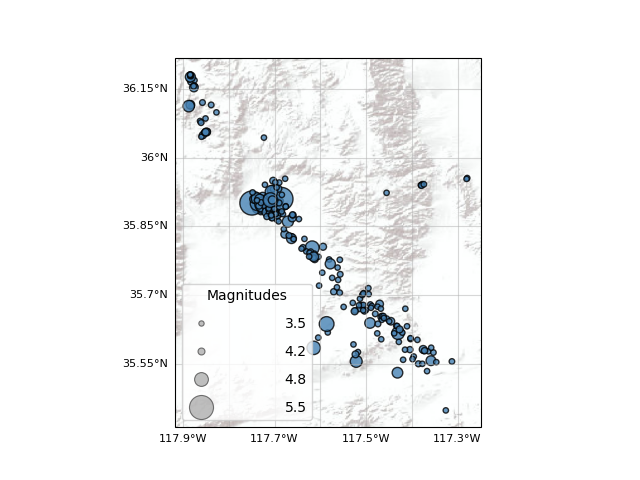
<GeoAxes: >
To plot the magnitude time series, use plot_magnitude_vs_time()
catalog.plot_magnitude_versus_time(show=True)
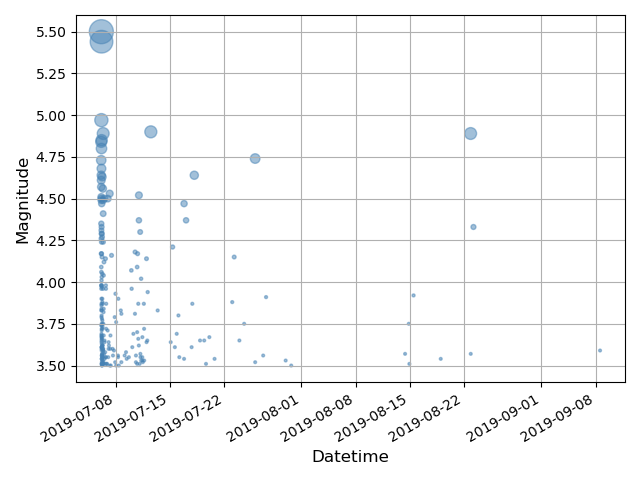
<Axes: xlabel='Datetime', ylabel='Magnitude'>
Write catalog
Use the method write_ascii() to write the catalog into the comma separated value format.
catalog.write_ascii('2019-11-11-comcat.csv')
Load catalog
Also, the function csep.load_catalog() can be used to read catalogs un multiple formats (See Catalogs)
catalog = csep.load_catalog('2019-11-11-comcat.csv')
Total running time of the script: (0 minutes 25.546 seconds)